

If you’re a marketer or a product manager developing mobile apps, you might not want to miss this important article.
This article is Part 2 of the MarTech Stack for Tracking & Measurement series. I will delve deeper into two tools that support marketing activities and essential product measurements specifically for mobile apps.
In Part 1 of the article, I introduced the business background of my own company. This helped readers understand how we plan and execute MarTech Stack for Tracking & Measurement. Additionally, I provided a more in-depth introduction to the two tools, Google Tag Manager and Google Analytics 4, designed for websites.
If you haven’t explored Part 1 yet, take a moment to read and understand all the tools introduced in this stack. Read it here.
Now, let’s continue from Part 1 with the Appsflyer tool!
6- Appsflyer

Tool Overview:
Appsflyer is an incredibly important tool for my company. And if your company is involved in Mobile App Marketing activities, it’s also a choice you should consider!
Appsflyer, along with Adjust and Singular, belongs to the MMP (Mobile Measurement Partner) group. It helps you measure, perform attribution tracking, evaluate the effectiveness of marketing activities, app user quality, and much more. And indeed, you cannot do without it!
And… even though there are many alternatives out there, I will always be loyal to Appsflyer because it is a truly excellent product! From how they update the product to the comprehensive and well-invested product documentation system.
Use Cases:
As mentioned above, Appsflyer greatly assists you in marketing activities on Mobile Apps platforms. Let’s explore below:
A- Attribution Tracking

Appsflyer helps you determine the source of users entering your app.
For example, when you have UAC (Universal App Campaigns) advertising activities on platforms such as Google Ads, Facebook Ads, Twitter Ads… Appsflyer will help you track and report accurately where users come from. But before that, you need to perform some steps to integrate Appsflyer with the ad platform for data exchange.
Alternatively, you can also set up manual tracking links to measure for other types of campaigns (such as Social Media, Email Marketing…)
Knowing where customers come from, how the conversion rate is, and what the ROI is becomes incredibly important, especially when you are a marketer. For this reason, I put this use case first, and it is also the most important use case in my own work experience.
Do you want to delve deeper and apply Attribution Tracking for your business?
Nemo Marketing has a series of articles on this topic. Among them, the Attribution Tracking for Mobile App section provides detailed guidance on Appsflyer, from mindset to how to use this tool in the easiest way to understand. Read the following content if you are interested:
1- What is Attribution Tracking? – READ HERE
2- Attribution Tracking for Mobile Apps – READ HERE
B- Marketing Platform Integration

We’ve discussed integrating Appsflyer with Ad Networks above. Not only does it serve the purpose of Attribution Tracking, but integration also helps Appsflyer exchange event data with Ads Networks, using this data to optimize automated advertising campaigns.
For example:
On Appsflyer, you set up and track a “Purchase” event to know how many people make purchases. You can integrate with Google Ads to let this ad network know that you want to target users likely to take this “Purchase” action. From there, Google Ads will help you find a suitable audience and gradually increase the Conversion Rate with a lower CPA.

If you’re familiar with Facebook Pixel, this is a similar use case.
Our Marketing Team 100% utilizes this use case to optimize ads performance. Besides Appsflyer, you can also use Firebase in a similar way (as I explained in the Firebase section above).
C- Reporting: Traffic, Users & Event
Appsflyer’s reporting tool is very diverse. It helps you explore many insights into users, traffic, and events that you would never have expected.
You will need time to explore and use it yourself to fully understand the potential of Appsflyer in reporting and measurement. However, I will suggest the 3 most important report groups for you:
Group 1: Basic Traffic, Users & Events Analytics
In its role as a measuring tool, Appsflyer allows you to report various metrics such as Sessions, Traffic, Installs, Uninstalls, In-app Events, etc., and can break them down by various dimensions such as Media Source, Event Name, Keywords, and more.

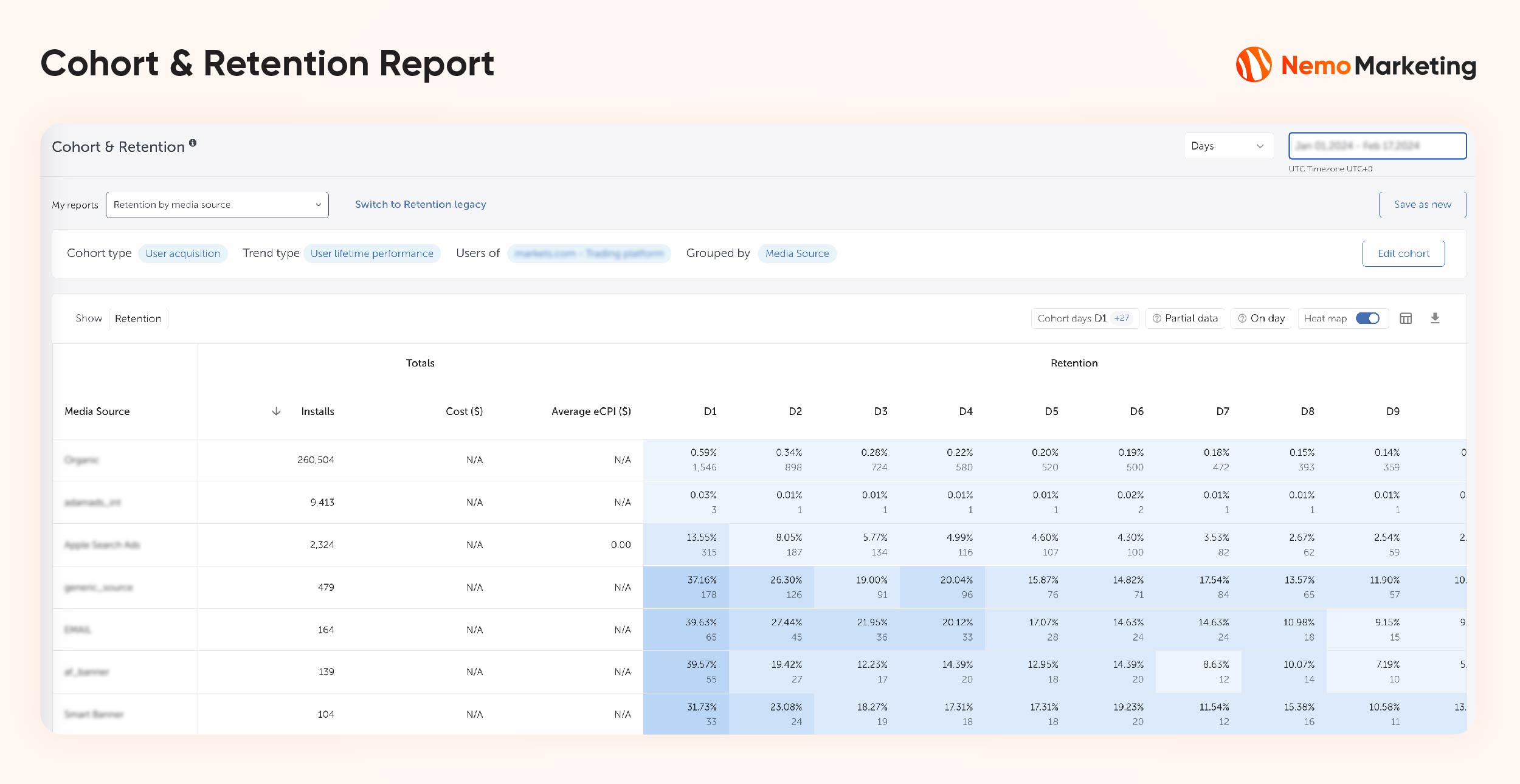
Group 2: Cohorts & Retention Analytics
You can group users into different cohorts, then report the changes of a specific metric over the days for this user group.
In the example in the image, users are grouped by Media Source. Columns from D1 to D10 represent the retention metrics of users for each day. (D1 is the first day after the user installs the app. The install day is designated as D0 but is not displayed in this dashboard.)
As you can see in the image, for Media Source = ‘googleadswords_int,’ the retention rate on D1 is 11.46%.
This implies that if you had 100 users install the app on D0, then on the next day (D1), only 11.46 users are still active on your app (this is a very low retention rate).
Group 3: iOS 14+ SKAN Analytics
You might be aware, but starting from iOS 14 and onwards, Apple will restrict your ability to collect user data (almost entirely). Therefore, Appsflyer can’t report data to you in a conventional way as it does for Android. Instead, they have a unique approach to support measuring metrics related to traffic, attribution, and user behavior on iOS14+.
The SKAN dashboard will look like the image below. It’s relatively easy to use, but I still encourage you to read the documentation on SKAN provided by Appsflyer to better understand how they calculate and display data.
Remember that without this feature, you would never be able to measure iOS14+. So, it’s crucial!

D- Server-To-Server Events (S2S Events)
If you’ve worked with in-app events, you probably understand their crucial role in measuring product performance and optimizing advertising using event data.
However, not every event can be directly set up on the SDK; some must be sent from the Server.

Take the “purchase_success” event, for example.
If, on the App SDK, the deepest level you can track is “purchase_confirm,” and you can’t track all the way to “purchase_success.”
Why? It’s because after executing “purchase_confirm,” the transaction request data is sent from the App to the Server. Only the Server knows if it is a “purchase_success” or not; the App SDK has no knowledge of this.
This is where the S2S Events feature of Appsflyer comes in handy. It allows you to send events from the server to Appsflyer using user identifiers as a join key between the two systems. This way, you can measure essential events that don’t occur within the app environment.
In practice, in my company, we also couldn’t measure “purchase_sucess” events with the App SDK because these events are only executed on the Server. After sending S2S Events from Servers to Appsflyer, media buyers used these events to optimize campaigns, target highly effective lookalike audiences, and reduce CPA costs.
Pros and Cons of Appsflyer:
Pros:
- Truly, Appsflyer is a great product that continuously develops features seriously. As I mentioned, there are many other options, but I will always remain loyal to Appsflyer.
Cons:
- However, with good quality comes a not-so-cheap cost. The package our company is using is priced at 23,000 USD/year with a limit of 750,000 installs.
Read more about Appsflyer:
Appsflyer has an extensive article library, depending on what information you’re looking for. You can try visiting their blog and using the search function.
From a personal standpoint, I must thank Appsflyer’s blog articles as they provided me with foundational knowledge on First Attribution Tracking, Re-Attribution, Event Management, S2S Event, iOS14+ SKAN… All of this knowledge contributed to the articles of Nemo Marketing today.
Read here: https://www.appsflyer.com/blog/
6- Firebase

Tool Overview:
In general, Firebase is a stack leaning towards App Development. However, you can think of it as similar to Google Tag Manager in setting up code and events.
According to Firebase’s official site: Firebase is an app development platform that helps you build and grow apps and games users love. Backed by Google and trusted by millions of businesses around the world.
Use Cases:
Even though this is a Developer’s stack, from a Marketer or Data Analyst’s perspective, you should be aware of some essential related functionalities.
A- Event Management
This is where developers configure in-app events. Here, you can also manage events alongside developers.

B- Marketing Platform Integration (Google’s Platforms only)
In the role of a marketer, if you are executing user acquisition activities for Mobile Apps through Google’s advertising networks, you must visit Firebase.
Firebase allows you to integrate with Google Ads and other platforms to exchange in-app event data (especially conversion events) for optimizing the advertising platform through Machine Learning. Or, with event data and user data, you can create segments on the ad network to customize the target audience.
Real-world experience:
Not only does Firebase have this integration feature, but Appsflyer (mentioned above) also has something similar. However, I always encourage using Firebase. Because, as a former Media Buyer, I clearly saw that the results of campaigns connected to Firebase were much better than Appsflyer.

C- A/B Testing
Whether you are a Product Manager, Conversion Rate Optimizer, or a Funnel Marketer, this feature will be very useful for you to test:
- New features/user flows inside the app (Remote Config)
- Different versions of Push Notifications
- Different versions of In-app Messaging

In reality, we only use Firebase to test new Features and User Flows. For example, we once tested the App Tour feature for newcomers to see if the conversion rate of the group participating in the App Tour was higher.
The report of an A/B test is also shown directly on Firebase. For basic testing needs, you can use the available reports on Firebase. But if you need deeper analysis by joining with other internal data, Firebase can also support you. Firebase sends raw event data to Google Analytics 4, which is then sent to BigQuery. On BigQuery, you can transform and join internal data to provide customized information that the basic report mode of Firebase A/B Test cannot provide.
D- Cloud Messaging
The Cloud Messaging feature is for marketers who want to leverage Push Notification and In-app Message channels to engage with in-app users. You can set up marketing campaigns to send to target users using your app.
Honestly, my company doesn’t use this feature of Firebase; we use Braze instead (we have an article about Braze). So, I won’t delve into this feature. It’s just a suggestion for you to be aware that you can take advantage of Cloud Messaging for free for your business.
E- Crashlytics
This feature is entirely for Product Development. It helps you grasp metrics about App Crashes. Very useful for monitoring the stability of the app.
The feature helps you see overall metrics such as Crash-free users %, Crashes event, Users… Not only that, it also allows you to discover and explain the issues causing App Crashes for resolution (look at the real-world example in the image to understand better).

Pros and Cons of Firebase:
In general, Firebase is a fundamental tool, necessary for any business operating in the app space. Especially since it is free for certain needs.
Therefore, I find this tool good and sufficient. There is neither praise nor criticism for it.
Read more about Firebase:
You can read more articles from Firebase’s blog: https://firebase.blog/
Conclusion of the MarTech Stack for tracking and measurement
That covers all the MarTech Stack for tracking and measurement that my company is currently applying in practice during operations.
If you are looking for a similar stack for your company, you should outline the real needs of your business, compare them with the use cases I have shared above. If they match, you can implement or explore other alternative solutions.
What I want to convey in this series of articles about MarTech Stack is not to tell you that this tool or that tool is the best. The main thing is that I want to provide you with basic concepts (at least, you will know “ah, it turns out there is a tool like this”). From there, you can delve deeper to find the stack that best fits your business.