
Data has long become crucial for businesses, especially those operating in the technology and digital sectors.
From a Marketing and Product perspective, tracking and measuring data are even more essential. While the Product Team needs to understand any issues with their platform (web & app) and how new product features are performing, the Marketing Team must grasp the user journey and track customer sources to optimize ROI.
Therefore, when embarking on a new project, it’s crucial to carefully select a MarTech Stack for Tracking & Measurement.
In this article, I will share practical experiences in choosing and utilizing tools for Tracking & Measurement, proven through usage at the company I work for.

1- Business Background
Product Platform:
I am employed by a Trading Broker that provides various financial products, including Forex, Stocks, Indices, Crypto, and more. Customers utilize our platforms to engage in buying and selling these financial instruments.
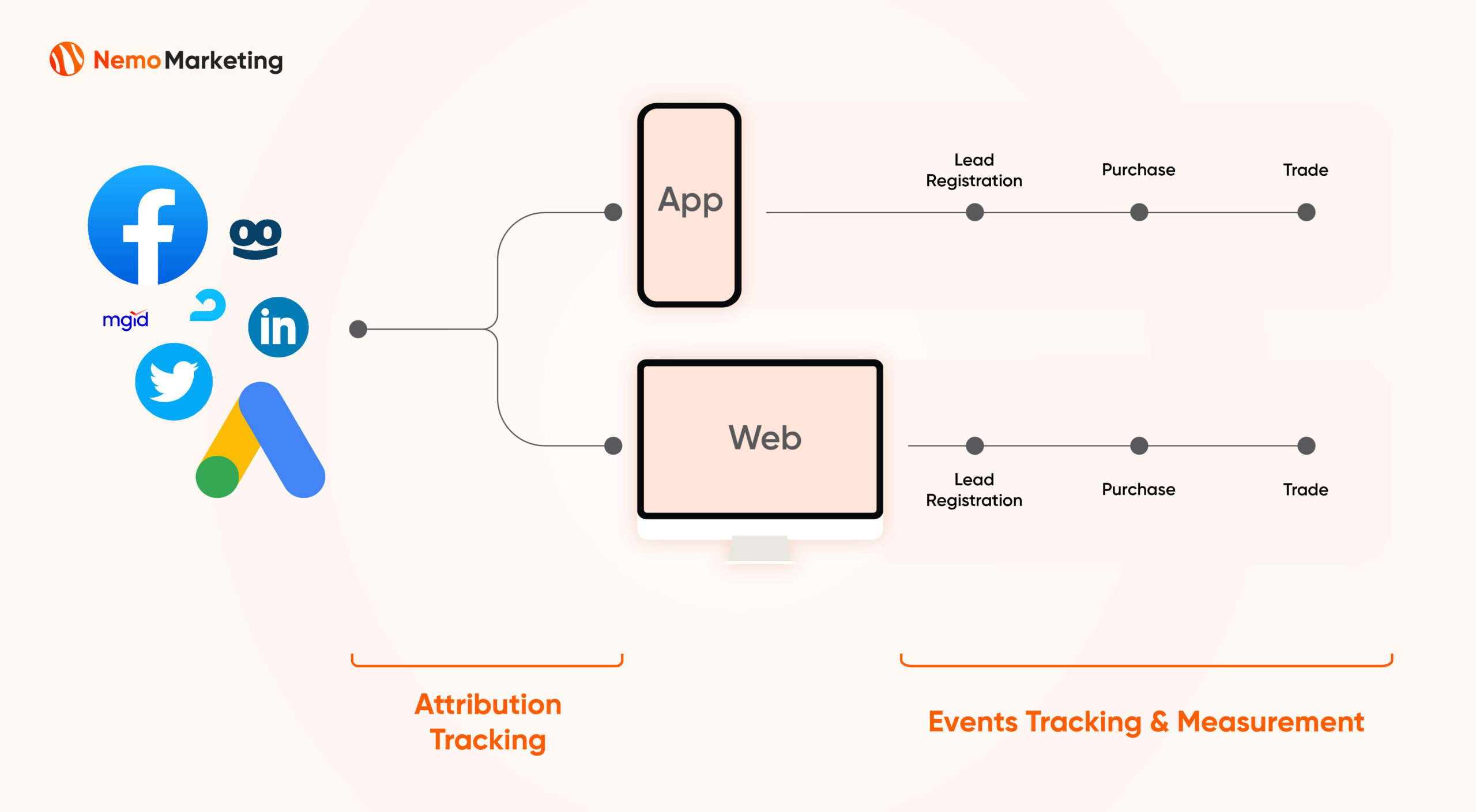
As a trading broker, my company operates extensively on both the Website and Mobile App product platforms. Hence, tracking and measuring product activities are extremely crucial.
Moreover, the marketing team acquires customers from diverse sources, making attribution tracking essential to optimize ROI for various channels.
Responsible Staff (Users) and their Needs:
There are two primary user groups for the Tracking and Measurement Stack, as follows:
Product Team:
This group includes product managers, front-end developers, UX/UI designers, etc. Their usage needs are as follows:
- Measure traffic and track user behavior on the mobile app and website.
- Evaluate the effectiveness of new product features.
- Identify issues with the products (mobile app and website).
- Set up events and debug events.
Marketing Team:
Comprising marketing managers, media buyers, ASO/SEO specialists, Social Media specialists, Campaign specialists, content executives, designers, etc., they have the following usage needs:
- Track customer sources (attribution tracking).
- Measure various traffic metrics.
- Measure the customer journey, aiming to identify issues within the journey.
- Conduct in-depth analyses, such as SKAN from iOS 14.5+.
2- Stack Overview
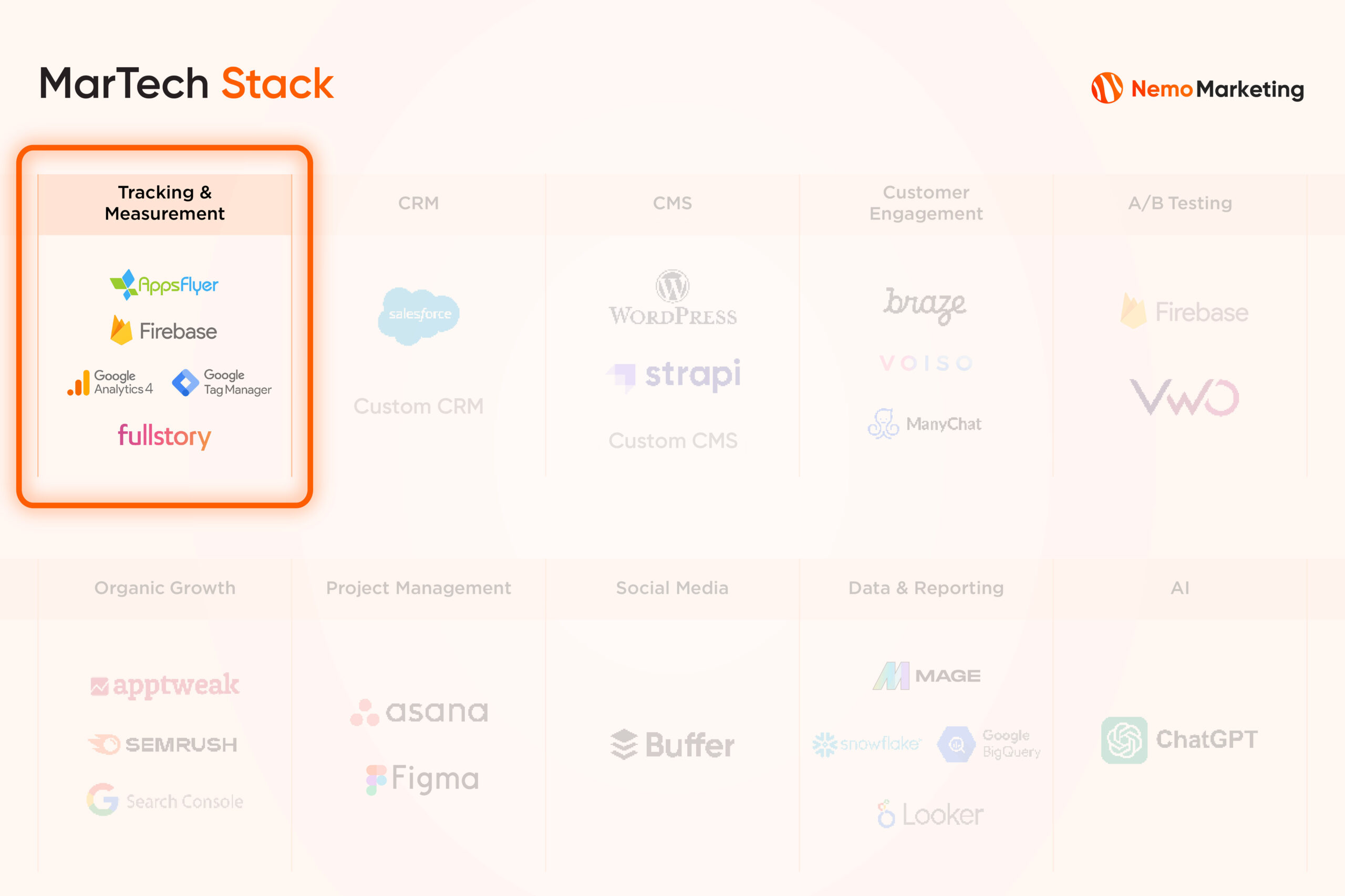
Introduction:
Among the numerous measurement platforms in the market, we actively selected the most popular ones, indicating their proven effectiveness and abundant reference materials.
These include Google Tag Manager, Google Analytics 4, Google Firebase, Appsflyer, and FullStory.
Why Google?
Three out of five tools come from Google, and we have reasons for choosing them:
- Completely Free, requiring no additional costs.
- Scalable, accommodating the increasing event data by streaming events and storing them in BigQuery with reasonable costs, without limitations on session count or event count like other platforms.
- Robust features continually developed by Google.
I mentioned FullStory, but I will not review FullStory. Why?

FullStory is a product measurement platform and can be compared to Google Analytics 4. Essentially, both tools assist non-tech users in building product reports, traffic reports, etc. In the list of tools above, we notice the presence of FullStory.
However, my company has ceased widespread use of this tool, and I won’t review it for the following reasons:
- Currently not widely used in our business.
- FullStory has limitations on the number of sessions and uncertain measurement methods. We have never been confident in the data provided by FullStory.
- We’ve had the opportunity to work with FullStory’s raw event data, and it’s chaotic and unacceptable. This has further eroded our confidence in the tool.
- Expensive, with a price tag of 50,000 USD/year but lacking standout features.
So, if you’ve heard of FullStory and are considering exploring it, think carefully, as, for me personally, it’s a dreadful tool.
Disclaimer:
Read this section carefully as it’s crucial. Regarding Measurement & Tracking tools, thorough consideration is necessary as not every business model can use similar tools. Based on the needs and resources of my company, Google’s tools are highly optimized and suitable, as follows:
Needs:
What we need is raw event data. Data needs to be returned in its original form, and we can comfortably process data in our own way.
We will extract customer_id from the raw event table to connect with our server data for in-depth analysis.
Therefore, we don’t need tools that support too much in-depth Analytics and Reporting because we have our own way of customization that no tool can match our needs.
Hence, a basic combo including Google Tag Manager, Firebase, Google Analytics 4 combined with Google BigQuery is very suitable for this requirement.
Resources:
To fulfill these needs, our company has a data team (directly managed by me) to transform raw event data into insights through data processing and data visualization.
If your measurement needs are simpler than ours, you can still use tools with built-in basic Analytics and Reporting like Google Analytics 4, or seek more advanced solutions like Adobe, Oracle, or FullStory.
If you need advice, feel free to email me.
3- Google Tag Manager (GTM)

Tool Overview:
Google Tag Manager is commonly used to set up events on a website or attach scripts to a website without causing it to slow down.
From the perspective of a Marketing Technologist, this is a tool I use extensively, and I believe that every marketer should know how to use this tool, even master it.
Use Cases:
Below are the most practical use cases that our company is currently using.
A- Website events configuration
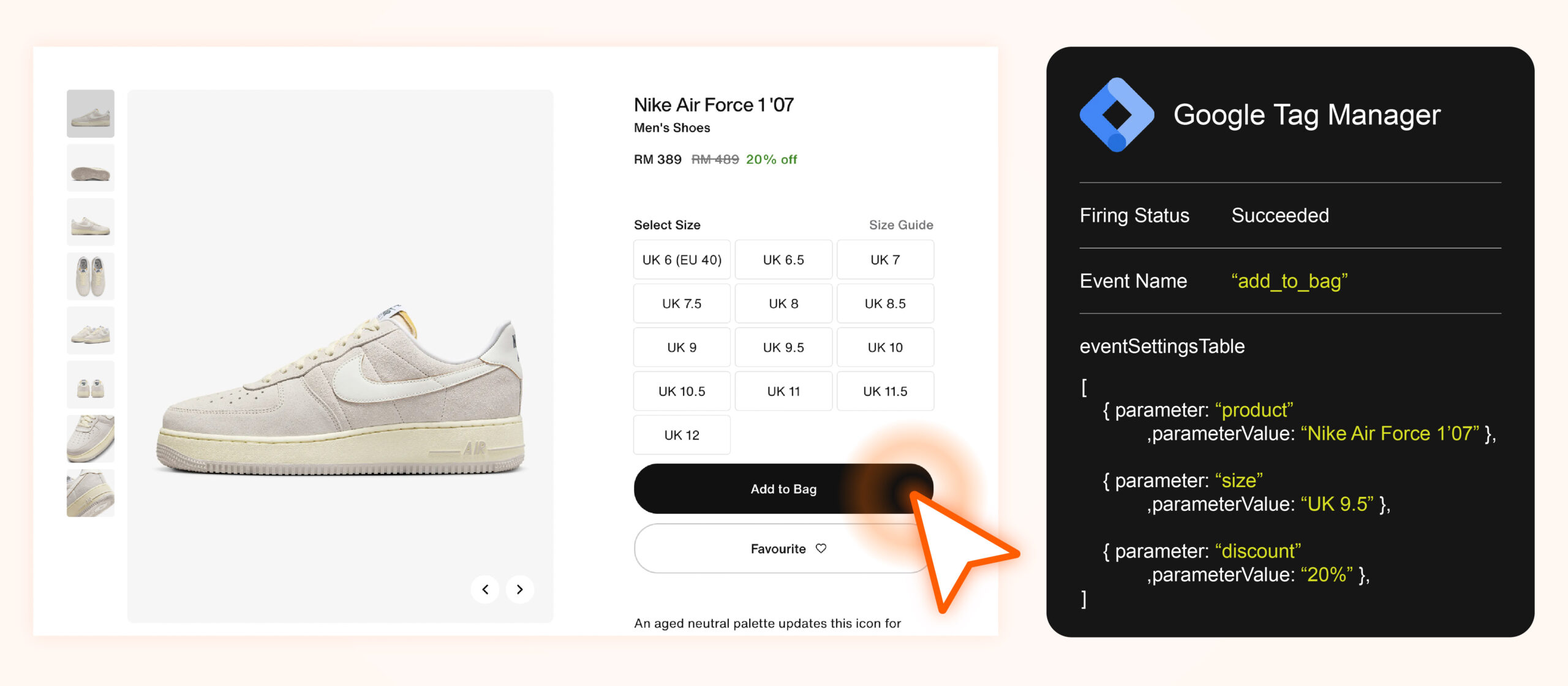
You can set up events on GTM. For example, if you want to measure an event like “purchase_success,” Google Tag Manager is the tool that enables you to do that.
Essentially, GTM will capture the data layer on your website and organize it into an event.
You need to familiarize yourself with the concepts and relationships among the three main elements in GTM: Trigger, Variable, Tag. These are the three basic components to create an event. You can also understand through the illustration below.
B- Debugging the website
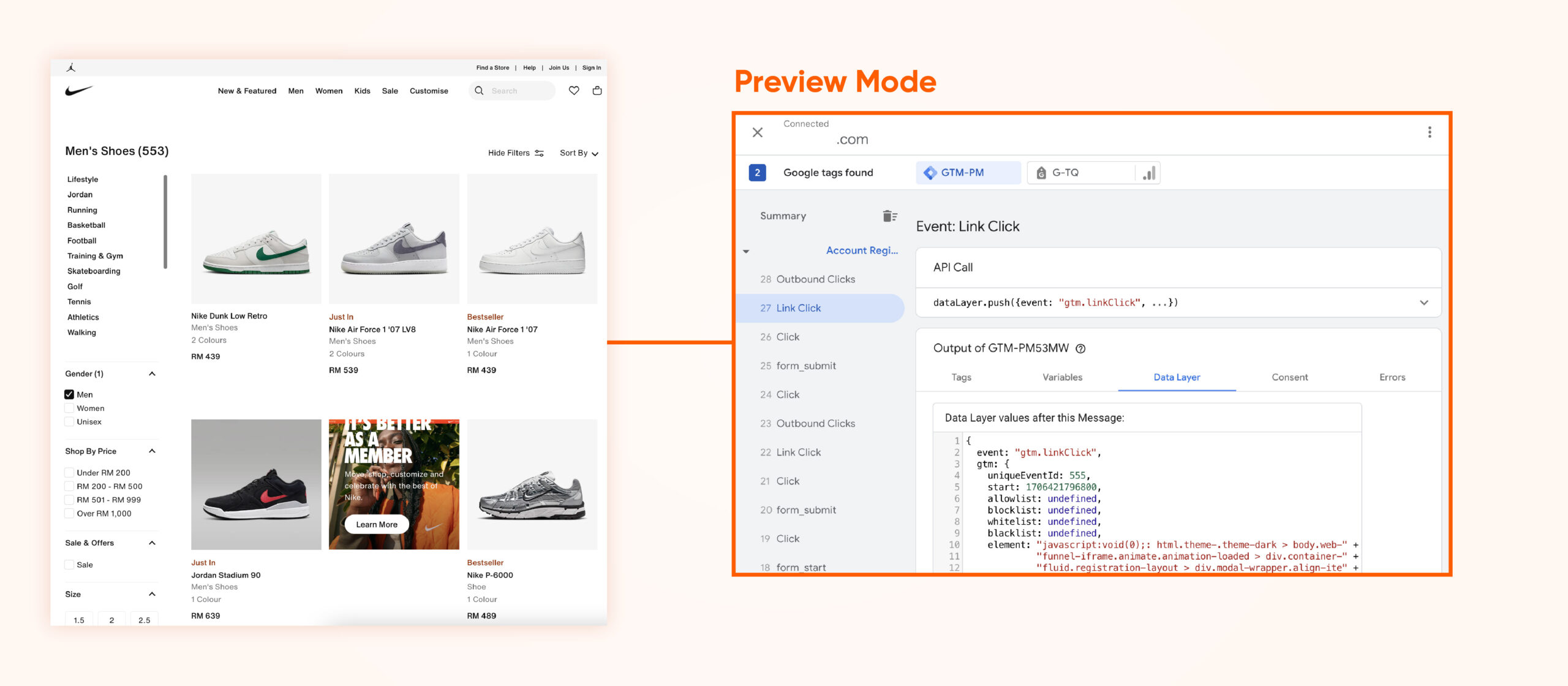
After setting up the event above, you can debug to check if the event has been set up correctly:
- Has the event been triggered under the right conditions?
- Has the event sent all the required data layers?
- Is there any delay or loss in the event?
In real situations, I use this function after setting up a new event or when I need to recheck the logic and data layers of existing events for a specific analytics purpose.
C- Sending Event Data from Google Tag Manager to Google Analytics 4 for Analysis
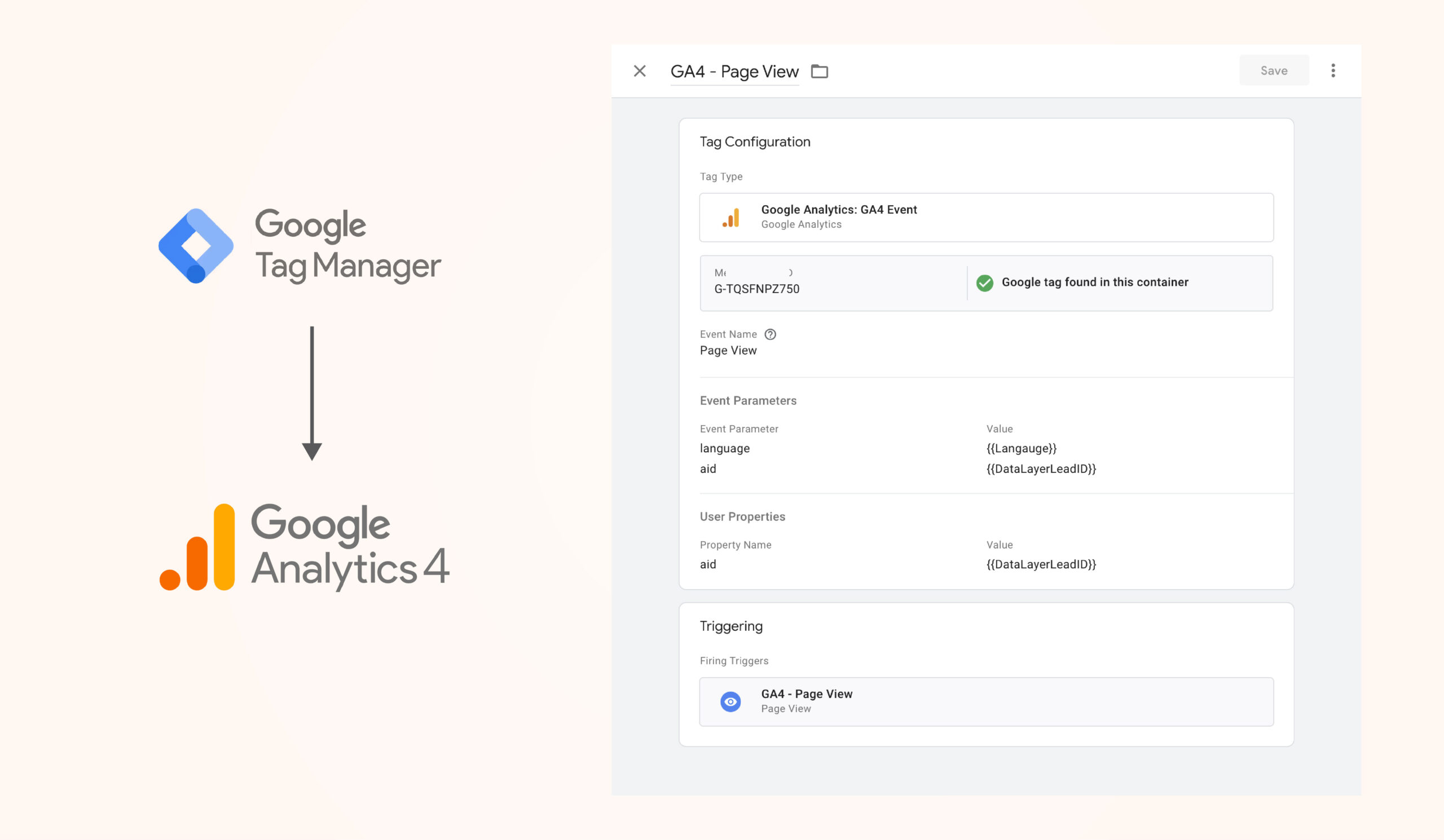
Moreover, you can specify the destination of event data. Our company will connect Google Tag Manager to Google Analytics 4 to store and analyze data (we will delve deeper into the Google Analytics 4 tool just below).
D- Setting up Custom Tracking HTML for the Marketing Team
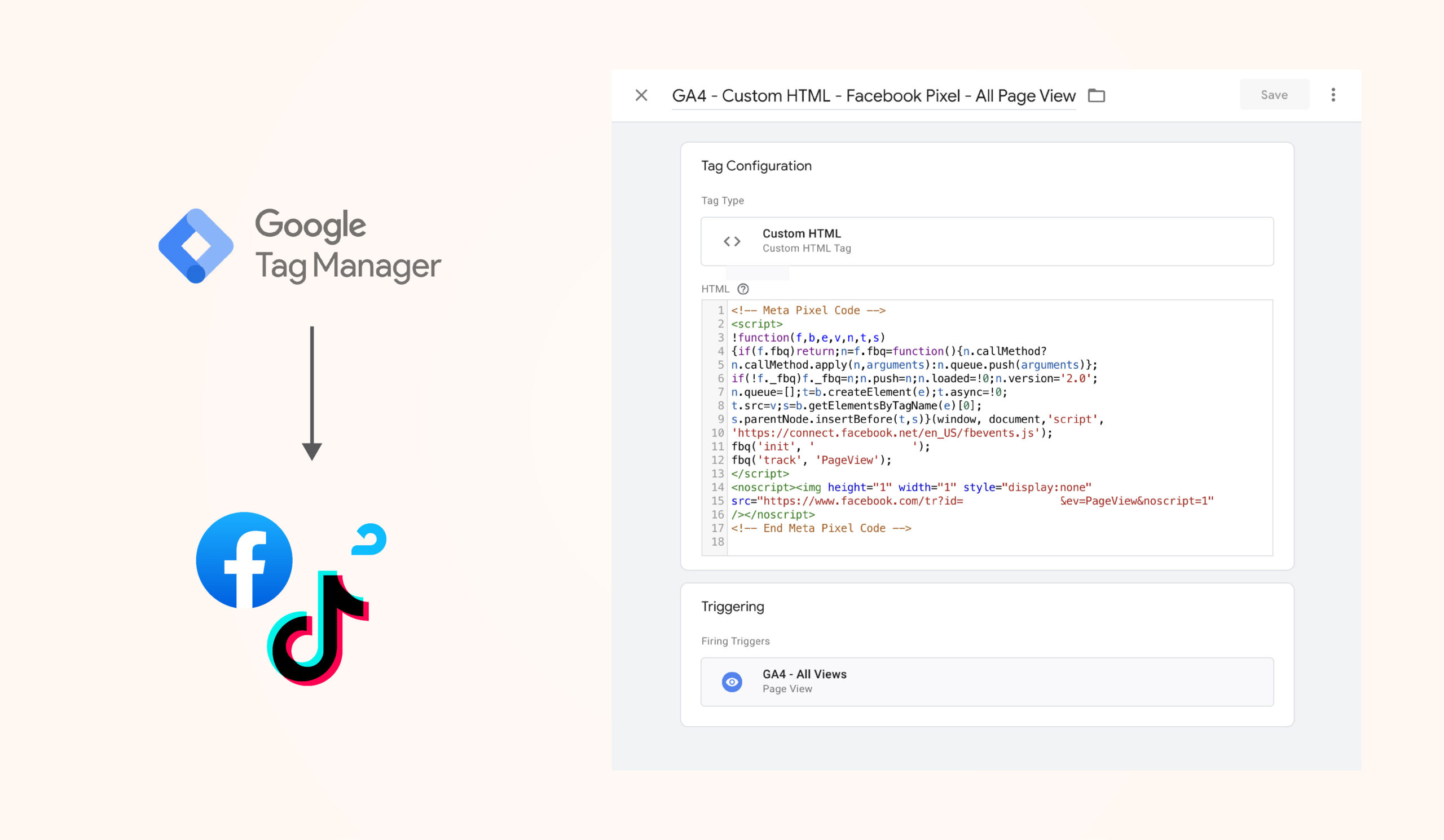
The marketing team continually runs ad campaign landing pages on various ad networks, and they need to measure and optimize by installing Pixels on the website (such as Facebook Pixel, TikTok Pixel, etc.).
The purpose of this is to provide data to ad networks. The ad networks will then use your data along with their machine learning systems to optimize ad performance and lower CPA for you.
With GTM, you can set this up easily. You just need to create a tag, choose the trigger condition, then paste the Custom HTML, and you’re done. The event will be sent to the ad network, and the ad network will use the data to optimize ad performance for you.
Pros and Cons:
Pros:
- User-friendly and easy to use.
- Abundant support documentation is available on the internet (details in the Reading section).
- Free and scalable.
Cons:
- Personally, I don’t see any issues with this tool.
Reading:
In addition to Google’s official sources https://support.google.com/tagmanager, I recommend the website www.analyticsmania.com and the YouTube channel https://www.youtube.com/@AnalyticsMania, quality learning resources that helped me gain a deeper understanding of this tool.
4- Google Analytics 4 (GA4)

Tool Overview:
Google Analytics 4 is a tool where you can measure metrics related to the traffic, users, and engagement of both websites and mobile apps.
If you want to measure a website, you can send events from Google Tag Manager to Google Analytics 4. For mobile app measurement, events are sent from Firebase to Google Analytics 4.
Use Cases:
Google Analytics 4 is a user-friendly tool, although it requires some time to get used to. From my experience as both a data analyst and a marketer, here are common use cases:
A- Data Analysis

Explore default reports on Traffic Acquisition, User Engagement, and User Attributes, allowing some customization.
Or dive into the Explore section, where you can visualize data in various ways. View data across different dimensions like page title, event name, country, and multiple metrics such as active users, sessions, and engagement time.
In general, if you need a solution for analyzing front-end data and collecting simple metrics, Google Analytics 4 can handle this well. I often use it to track traffic trends for both mobile apps and websites and occasionally answer ad-hoc data questions from users.
B- Platform Integration

As a Google product, GA4 lets you integrate with other products in its ecosystem, such as Google Ads, Google Play Console, and Google Search Console.
The purpose of this integration is for these platforms to pull and push data to support each other. For example, GA4 pushes data to Google Ads to help optimize ads through machine learning. Conversely, Google Ads pushes data back to GA4 to report advertising metrics, combined with web traffic and attribution metrics.
C- BigQuery Data Stream

This is also a type of Platform Integration, but I separate it because this feature is crucial, especially for my company’s case.
As explained earlier, our company needs to collect raw event data for advanced data analysis tasks. Therefore, we need to perform BigQuery integration to load or stream data from GA4 to BigQuery.
From there, we can always store raw event data securely and automatically in BigQuery.
D- Debugging

From the perspective of a Product Analyst or QA Engineer, Debugging is an essential function to help us check event tracking on mobile apps and websites.
With this feature, you can verify if events are triggered according to the briefed logic and if events return the correct and sufficient event parameters.
It’s worth emphasizing that this is a basic but extremely important function to ensure accurate event data operation.
Pros and Cons:
Pros:
- Free and scalable
- Supports various platform integrations (explained benefits in section B)
- User-friendly with many important features
Cons:
- Limited ability to visualize data and provide insights compared to paid versions of other service providers
- Unable to customize reporting metrics. For instance, you can’t set up a metric like Count Transaction_ID, even if you’ve set up an event with the event parameter Transaction_ID
- GA4 uses aggregated data on the UI for us to view. Because it uses aggregated data, sometimes the data may be accurate but can be confusing for users
However, these three issues do not affect my company because we have a dedicated data team to work directly with raw event data. Regardless of the type of insights required, we can handle it.
If you don’t have a data team, you may want to research more about GA4 to understand its challenges and find ways to overcome them or explore alternative measurement tools (though you may need to pay).
Reading:
In addition to Google’s official sources (https://developers.google.com/analytics), I recommend the website www.analyticsmania.com and the YouTube channel AnalyticsMania for quality learning resources about this tool.
Conclusion
Part 1 of this series has provided you with background information on the case study and offered a deeper introduction to the two tools, Google Tag Manager and Google Analytics 4. If you are also interested in similar tools for mobile apps such as Firebase and Appsflyer, please continue reading Part 2 here.